OneManVJ — Auto VJ Software with Audio Fingerprint Recognition
A downloadable software for Windows and macOS
# OneManVJ
## Play the music. The visuals take care of themselves.
OneManVJ is an auto VJ software that listens to the music
playing around it, identifies the song through audio fingerprint
recognition, and automatically plays the matching video — synced
to the exact position in the track.
No dedicated VJ needed. No manual switching.
Just drop in your videos, play a song, and let OneManVJ handle it.
Clubs, bars, house parties, live streams, ambient installations —
if there's a speaker and a screen, you're good to go.
---
## 🎁 Beta Version
This download is the free Beta version.
All Pro features are fully unlocked until May 8, 2026.
- Song library: Unlimited
- Watermark: None
- All features: Fully unlocked
*After the deadline, it automatically reverts to the Free edition (5-song fingerprint limit).*
*Pro ($29, one-time purchase / permanent license) will be available after launch.*
---
## 🎯 Who it's for
- **DJs** who want live visuals without hiring a VJ
- **Bar & café owners** looking for music-reactive ambient video
- **Event organizers** running the show solo
- **Streamers** stepping up their visual production
- **VJs** who want an intelligent auto-pilot as backup
---
## ⚡ Features
### 🎵 Automatic Song Recognition (Audio Fingerprinting)
Listens through your PC's microphone, identifies the track via audio
fingerprint matching, and fires up the matching video — synced to the
exact playback position. Think of it as Shazam, but for visuals.
### 🎵 Automatic Tempo Tracking
Tracks playing at ±10% BPM are still recognized accurately.
(e.g. a 120 BPM track played back at 132 BPM)
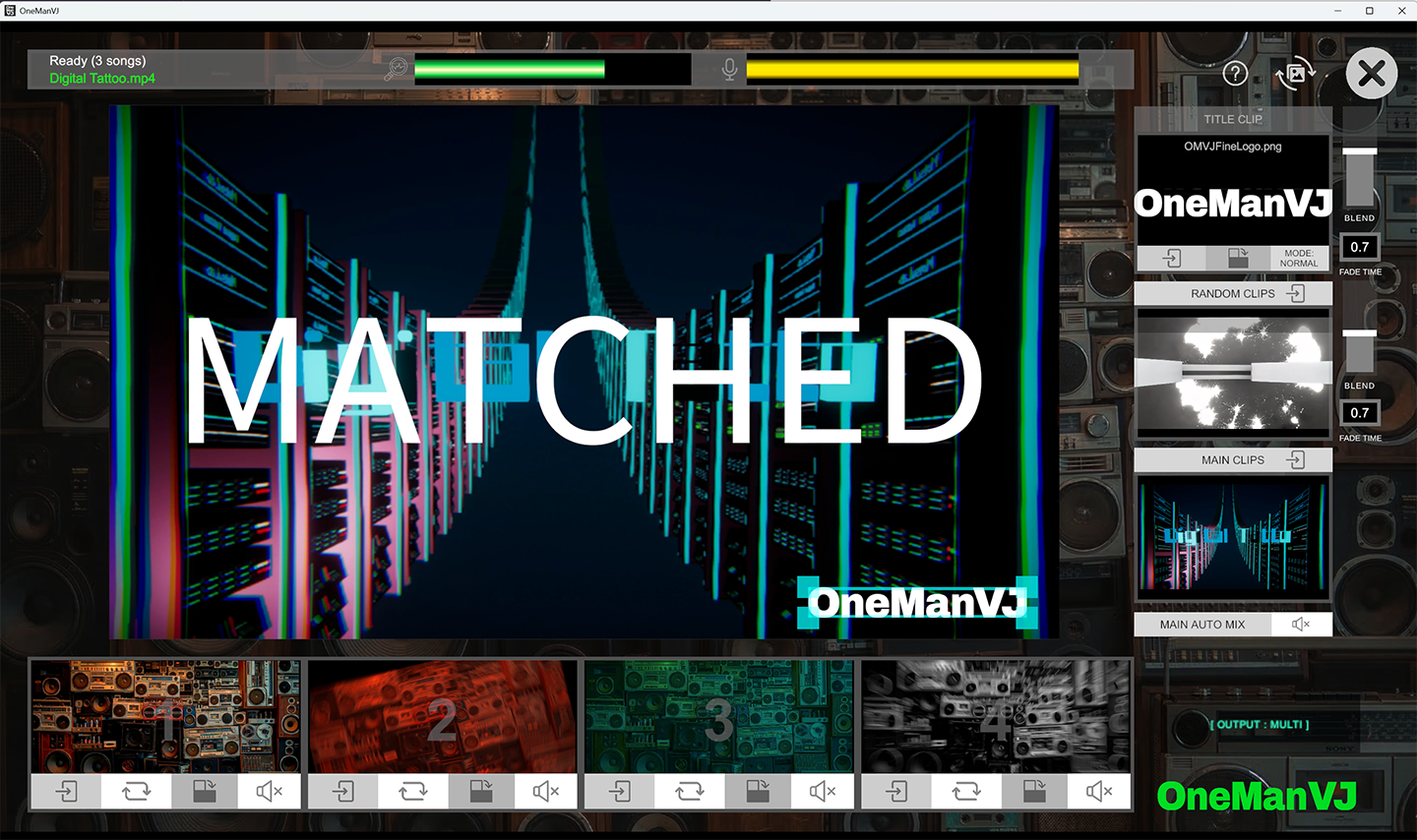
### 🎬 Dual-Deck Crossfade
DJ-style A/B deck system for smooth video transitions.
No hard cuts, no black frames — just clean, professional mixing.
### 🌀 Glitch Mode
When the music stops or the DJ is between tracks, the screen doesn't
go dark. Random glitch visuals loop automatically with an adjustable
intensity slider — from subtle to full chaos.
### 🔄 Auto Mix
Randomly cycles through your video library with customizable duration
and crossfade timing. Set it up and let it run — perfect for ambient
setups or background visuals.
### 🖥️ Multi-Monitor Auto-Detection
Plug in a projector or second monitor and it's detected automatically.
Instant output, zero configuration. Single monitor? One click for
fullscreen.
### 🎹 Quick Slots × 4
Four instant-trigger pads for logos, bumpers, or hype clips.
Load them up, fire them off.
### 📂 Drag & Drop Import
Throw your video files into the window. Audio extraction,
fingerprinting, and indexing happen automatically.
Supports MP4, MOV, and WebM.
### 🌐 Cross-Platform
Runs natively on Windows (10/11) and macOS (Monterey+),
including Apple Silicon.
---
## 💻 System Requirements
**Minimum:**
- OS: Windows 10/11 (64bit) / macOS 12+
- CPU: Intel i5 / Apple M1+
- RAM: 8 GB
- GPU: DirectX 11 / Metal
- Storage: 500 MB + video files
- Audio: Built-in mic or audio interface
**Recommended:**
- CPU: Intel i7 / Apple M2+
- RAM: 16 GB
- Storage: SSD
Formats: MP4 (H.264), MOV, WebM
FFmpeg is bundled — no extra installs needed.
---
## 📦 What's included
- OneManVJ application (Windows .exe / macOS .app)
- UserFolders/
- MainVideos — 3 sample videos included
- RandomVideos — 8 glitch visuals included
- PadFiles — 4 quick slot clips included
- TitleFiles — 1 title overlay included
- DJAudioFiles — audio cache (auto-generated)
- AudioCache — fingerprint data (auto-generated)
- README.txt
---
## 🚀 Getting started
1. Launch OneManVJ
2. Drag & drop your video files into the window
3. Wait for the fingerprint processing to finish
4. Play music on any speaker
5. The matching video starts automatically
That's it. You're VJing.
---
## ❓ FAQ
**Does it work with Spotify / Apple Music / YouTube?**
Yes — it listens through your microphone, so the audio source doesn't
matter. You just need to import the corresponding video files beforehand
so the system knows what to play.
**How do I connect DJ gear?**
Route your mixer's REC OUT or Master OUT to your PC's audio input
(LINE IN or audio interface). That gives the cleanest signal.
Room microphone works fine too.
**What happens when the Beta expires?**
It automatically reverts to the Free edition (5-song fingerprint limit).
Your data and settings are preserved.
Purchase Pro ($29) to unlock unlimited again.
**Can I use it with OBS for streaming?**
Absolutely. Capture the output window with OBS Window Capture and
you're set.
**Do I need to be online?**
No. OneManVJ runs fully offline after download. No account required.
---
## 📜 License
- Personal and commercial use: ✅
- Resale or redistribution of the software: ❌
- Reverse engineering: ❌
- Video content copyright: your responsibility
---
🌐 deejei.tokyo
𝕏 @Motsu_MC
Made by MOTSU / DeeJei.Tokyo
Download
Install instructions
**Windows:**
1. Download and extract the ZIP
2. Run OneManVJ_Beta_Installer.exe
3. Follow the installer — you can choose any install location (internal drive, external SSD, USB drive, etc.)
4. Launch OneManVJ from the Start Menu or Desktop shortcut
**macOS:**
1. Download and extract the ZIP
2. Move "OneManVJ Build Mac beta.app" and "UserFolders" to the same folder (e.g. Applications, external SSD, etc.)
3. Double-click the .app to launch
4. If macOS blocks the app: System Settings → Privacy & Security → "Open Anyway"
💡 Both versions can be installed and launched from an external SSD or USB drive — great for portable setups at venues.
Leave a comment
Log in with itch.io to leave a comment.